

This post was originally published on this site.
WordPress lets you do almost anything on your site — from publishing blog posts and selling products to, yes, even adding playable games.
Games can be a fun extra or even a central part of your website experience. Whether used as digital easter eggs or interactive content, they’re a creative way to surprise visitors and keep them engaged.
In this guide, we’ll cover some WordPress-compatible games and explain how to add them to your site.
1. The Google Chrome Dinosaur Game
” data-medium-file=”https://sme-insights.co.uk/wp-content/uploads/2025/11/dino-game.jpg?w=300″ data-large-file=”https://sme-insights.co.uk/wp-content/uploads/2025/11/dino-game.jpg?w=1024″ width=”1400″ height=”743″ src=”https://sme-insights.co.uk/wp-content/uploads/2025/11/dino-game.jpg” alt=”Best WordPress games: The Google Chrome Dinosaur Game” class=”wp-image-82014″ srcset=”https://sme-insights.co.uk/wp-content/uploads/2025/11/dino-game.jpg 1400w, https://sme-insights.co.uk/wp-content/uploads/2025/11/dino-game.jpg?w=150&h=80 150w, https://sme-insights.co.uk/wp-content/uploads/2025/11/dino-game.jpg?w=300&h=159 300w, https://sme-insights.co.uk/wp-content/uploads/2025/11/dino-game.jpg?w=768&h=408 768w, https://sme-insights.co.uk/wp-content/uploads/2025/11/dino-game.jpg?w=1024&h=543 1024w” sizes=”(max-width: 1400px) 100vw, 1400px”>
In the Google Chrome Dinosaur Game, players control a T. rex that runs across the screen.
As the T. rex approaches various obstacles, players must click the space bar or up arrow to jump over barriers and the down arrow to crouch.
As the game progresses, the dinosaur runs faster and faces more obstacles. A player’s score is based on how far they run before hitting an obstacle.
Most Google users have probably played the dinosaur game before, so it doesn’t require much explanation. Its placement is particularly flexible because the game rarely lasts more than a few minutes.
In addition to using it as a fun reprieve amidst long posts or dense text, you can follow Google’s lead and use it on a custom 404 “not found” page.
How to add the Dinosaur Game to your WordPress site
You can add the Dinosaur Game to your WordPress site with the Dinosaur Game plugin.
Once you’ve downloaded and activated the plugin, you can add the game to different pages with a shortcode.
Simply add a Shortcode block to the page where you want the game to appear and type in the code [dinosaur-game].
” data-medium-file=”https://sme-insights.co.uk/wp-content/uploads/2025/11/dino-shortcode.jpg?w=300″ data-large-file=”https://sme-insights.co.uk/wp-content/uploads/2025/11/dino-shortcode.jpg?w=1024″ width=”1400″ height=”672″ src=”https://sme-insights.co.uk/wp-content/uploads/2025/11/dino-shortcode.jpg” alt=”Dino game shortcode” class=”wp-image-82016″ srcset=”https://sme-insights.co.uk/wp-content/uploads/2025/11/dino-shortcode.jpg 1400w, https://sme-insights.co.uk/wp-content/uploads/2025/11/dino-shortcode.jpg?w=150&h=72 150w, https://sme-insights.co.uk/wp-content/uploads/2025/11/dino-shortcode.jpg?w=300&h=144 300w, https://sme-insights.co.uk/wp-content/uploads/2025/11/dino-shortcode.jpg?w=768&h=369 768w, https://sme-insights.co.uk/wp-content/uploads/2025/11/dino-shortcode.jpg?w=1024&h=492 1024w” sizes=”(max-width: 1400px) 100vw, 1400px”>
2. Snake
” data-medium-file=”https://sme-insights.co.uk/wp-content/uploads/2025/11/snake.jpg?w=300″ data-large-file=”https://sme-insights.co.uk/wp-content/uploads/2025/11/snake.jpg?w=1024″ loading=”lazy” width=”1400″ height=”1230″ src=”https://sme-insights.co.uk/wp-content/uploads/2025/11/snake.jpg” alt=”Snake WordPress game” class=”wp-image-82017″ srcset=”https://sme-insights.co.uk/wp-content/uploads/2025/11/snake.jpg 1400w, https://sme-insights.co.uk/wp-content/uploads/2025/11/snake.jpg?w=150&h=132 150w, https://sme-insights.co.uk/wp-content/uploads/2025/11/snake.jpg?w=300&h=264 300w, https://sme-insights.co.uk/wp-content/uploads/2025/11/snake.jpg?w=768&h=675 768w, https://sme-insights.co.uk/wp-content/uploads/2025/11/snake.jpg?w=1024&h=900 1024w” sizes=”(max-width: 1400px) 100vw, 1400px”>
Based on a ‘70s arcade game called Blockade, Snake challenges players to use the arrow keys to control a snake as it slithers around the gameboard. The goal is to grow your snake by eating “food” on the gameboard.
However, you must dodge obstacles on the board and avoid running into your own snake’s tail. As the snake grows longer, it becomes increasingly difficult to move around the board.
With simple controls and fast gameplay, Snake has been both an arcade hit and a Nokia phone game. Now, you can also add it to WordPress for a bit of nostalgic fun.
How to add Snake to your WordPress site
Snake can be installed with the plugin Snake Retro Game Shortcode by Eskim. Simply install and activate the plugin through the Plugin Marketplace to get started.
To place the game on the page, add a Shortcode block and type in the game’s shortcode, [snake_game].
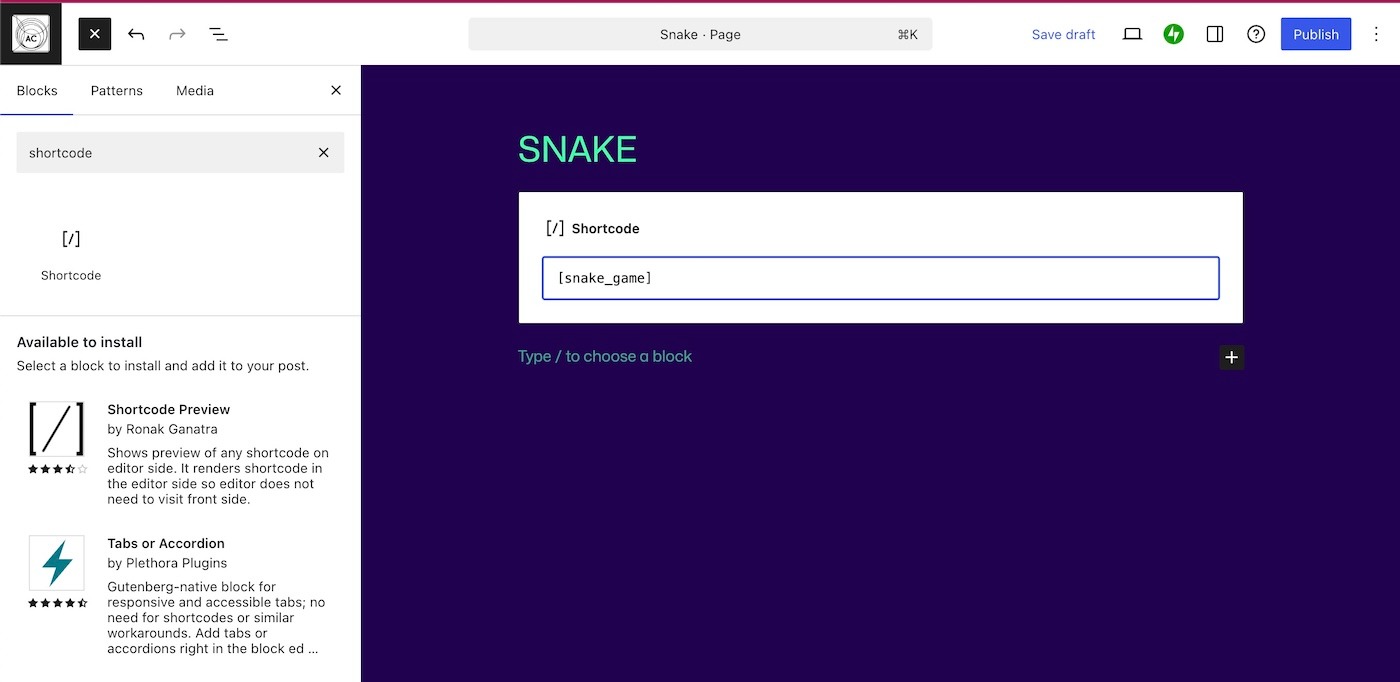
To customize the game’s colors, size, and speed, you can use additional shortcode parameters located on the Plugin’s description page.
We’ll dig in more on how to install and activate plugins at the end of this post.
3. DOOM
” data-medium-file=”https://sme-insights.co.uk/wp-content/uploads/2025/11/doom.jpg?w=300″ data-large-file=”https://sme-insights.co.uk/wp-content/uploads/2025/11/doom.jpg?w=1024″ loading=”lazy” width=”1400″ height=”710″ src=”https://sme-insights.co.uk/wp-content/uploads/2025/11/doom.jpg” alt=”The DOOM WordPress game” class=”wp-image-82019″ srcset=”https://sme-insights.co.uk/wp-content/uploads/2025/11/doom.jpg 1400w, https://sme-insights.co.uk/wp-content/uploads/2025/11/doom.jpg?w=150&h=76 150w, https://sme-insights.co.uk/wp-content/uploads/2025/11/doom.jpg?w=300&h=152 300w, https://sme-insights.co.uk/wp-content/uploads/2025/11/doom.jpg?w=768&h=389 768w, https://sme-insights.co.uk/wp-content/uploads/2025/11/doom.jpg?w=1024&h=519 1024w” sizes=”(max-width: 1400px) 100vw, 1400px”>
DOOM, the “father of first-person shooter games,” came out in the early ’90s and inspired an ongoing video-game franchise.
Players control an expelled space marine who must fight through radioactive waste facilities on Mars and kill enemies in hell to return to Earth.
Part of the interest and lore of the original DOOM is that it used a series of clever programming tricks to make it playable on slow, old computers, which makes it flexible and easy to run.
DOOM for WordPress was created by Rhyse Wynne, a DOOM lover and developer. Wynne built WP Doom as a custom plugin that wraps the 1993 DOOM shareware inside a JavaScript DOS emulator.
How to add DOOM to your WordPress site
This classic shooter isn’t available as a one‑click plugin because the WP Doom plugin wraps the shareware version of the game (and therefore isn’t listed in the plugin directory).
Wynne solved this by setting up a WordPress Playground blueprint that installs the plugin and spins up a demo page.
You can’t embed the game directly into your WordPress.com site, but you can link to Wynne’s demo.
” data-medium-file=”https://sme-insights.co.uk/wp-content/uploads/2025/11/play-doom.jpg?w=300″ data-large-file=”https://sme-insights.co.uk/wp-content/uploads/2025/11/play-doom.jpg?w=1024″ loading=”lazy” width=”1400″ height=”830″ src=”https://sme-insights.co.uk/wp-content/uploads/2025/11/play-doom.jpg” alt=”Adding the DOOM game in WordPress” class=”wp-image-82020″ srcset=”https://sme-insights.co.uk/wp-content/uploads/2025/11/play-doom.jpg 1400w, https://sme-insights.co.uk/wp-content/uploads/2025/11/play-doom.jpg?w=150&h=89 150w, https://sme-insights.co.uk/wp-content/uploads/2025/11/play-doom.jpg?w=300&h=178 300w, https://sme-insights.co.uk/wp-content/uploads/2025/11/play-doom.jpg?w=768&h=455 768w, https://sme-insights.co.uk/wp-content/uploads/2025/11/play-doom.jpg?w=1024&h=607 1024w” sizes=”(max-width: 1400px) 100vw, 1400px”>
When readers click the link, it launches a new browser tab where DOOM runs inside WordPress Playground.
4. WP Sudoku Plus
” data-medium-file=”https://sme-insights.co.uk/wp-content/uploads/2025/11/sudoku.jpg?w=300″ data-large-file=”https://sme-insights.co.uk/wp-content/uploads/2025/11/sudoku.jpg?w=1024″ loading=”lazy” width=”1400″ height=”822″ src=”https://sme-insights.co.uk/wp-content/uploads/2025/11/sudoku.jpg” alt=”Sudoku WordPress game” class=”wp-image-82022″ srcset=”https://sme-insights.co.uk/wp-content/uploads/2025/11/sudoku.jpg 1400w, https://sme-insights.co.uk/wp-content/uploads/2025/11/sudoku.jpg?w=150&h=88 150w, https://sme-insights.co.uk/wp-content/uploads/2025/11/sudoku.jpg?w=300&h=176 300w, https://sme-insights.co.uk/wp-content/uploads/2025/11/sudoku.jpg?w=768&h=451 768w, https://sme-insights.co.uk/wp-content/uploads/2025/11/sudoku.jpg?w=1024&h=601 1024w” sizes=”(max-width: 1400px) 100vw, 1400px”>
Sudoku is a number puzzle game that requires players to complete a 9×9 square of numbers.
Using number clues, players must place the remaining missing numbers into the empty squares, ensuring that every row, column, and small box on the puzzle contains the numbers 1-9 exactly once.
Since Sudoku requires some focus, it could be used to celebrate finishing a long blog post or on an FAQ page for added interest. You could also use it alongside short-form audio content, like a song or podcast clip, to keep users engaged while they listen.
How to add Sudoku Plus to your WordPress site
WP Sudoku Plus is another plugin available through the WordPress Plugin Marketplace.
Once installed, you can add a puzzle to a page by using a Shortcode block with the shortcode [sudoku].
Sixteen is the default puzzle size, but you can adjust it to be bigger (up to 32) or smaller (as small as eight) on the page.
To change the size, expand the short code to [sudoku size=”(number between 8-32)”].
” data-medium-file=”https://sme-insights.co.uk/wp-content/uploads/2025/11/sudoku-shortcode.jpg?w=300″ data-large-file=”https://sme-insights.co.uk/wp-content/uploads/2025/11/sudoku-shortcode.jpg?w=1024″ loading=”lazy” width=”1400″ height=”557″ src=”https://sme-insights.co.uk/wp-content/uploads/2025/11/sudoku-shortcode.jpg” alt=”Adding the Sudoku game” class=”wp-image-82023″ srcset=”https://sme-insights.co.uk/wp-content/uploads/2025/11/sudoku-shortcode.jpg 1400w, https://sme-insights.co.uk/wp-content/uploads/2025/11/sudoku-shortcode.jpg?w=150&h=60 150w, https://sme-insights.co.uk/wp-content/uploads/2025/11/sudoku-shortcode.jpg?w=300&h=119 300w, https://sme-insights.co.uk/wp-content/uploads/2025/11/sudoku-shortcode.jpg?w=768&h=306 768w, https://sme-insights.co.uk/wp-content/uploads/2025/11/sudoku-shortcode.jpg?w=1024&h=407 1024w” sizes=”(max-width: 1400px) 100vw, 1400px”>
5. Minesweeper
” data-medium-file=”https://sme-insights.co.uk/wp-content/uploads/2025/11/minesweeper.jpg?w=300″ data-large-file=”https://sme-insights.co.uk/wp-content/uploads/2025/11/minesweeper.jpg?w=1024″ loading=”lazy” width=”1400″ height=”830″ src=”https://sme-insights.co.uk/wp-content/uploads/2025/11/minesweeper.jpg” alt=”Minesweeper game in Telex ” class=”wp-image-82024″ srcset=”https://sme-insights.co.uk/wp-content/uploads/2025/11/minesweeper.jpg 1400w, https://sme-insights.co.uk/wp-content/uploads/2025/11/minesweeper.jpg?w=150&h=89 150w, https://sme-insights.co.uk/wp-content/uploads/2025/11/minesweeper.jpg?w=300&h=178 300w, https://sme-insights.co.uk/wp-content/uploads/2025/11/minesweeper.jpg?w=768&h=455 768w, https://sme-insights.co.uk/wp-content/uploads/2025/11/minesweeper.jpg?w=1024&h=607 1024w” sizes=”(max-width: 1400px) 100vw, 1400px”>
Minesweeper is a classic internet puzzle game from the 1990s. To win, players must click on all the free squares on the board without setting off a landmine.
Numbers next to landmine squares indicate how many mines touch that square on all sides. Using the numbers, you need to figure out which squares are safe to click.
” data-medium-file=”https://sme-insights.co.uk/wp-content/uploads/2025/11/minesweeper-2-1.jpg?w=300″ data-large-file=”https://sme-insights.co.uk/wp-content/uploads/2025/11/minesweeper-2-1.jpg?w=1024″ loading=”lazy” width=”1400″ height=”528″ src=”https://sme-insights.co.uk/wp-content/uploads/2025/11/minesweeper-2-1.jpg” alt=”Playing the minesweeper game in WordPress” class=”wp-image-82026″ srcset=”https://sme-insights.co.uk/wp-content/uploads/2025/11/minesweeper-2-1.jpg 1400w, https://sme-insights.co.uk/wp-content/uploads/2025/11/minesweeper-2-1.jpg?w=150&h=57 150w, https://sme-insights.co.uk/wp-content/uploads/2025/11/minesweeper-2-1.jpg?w=300&h=113 300w, https://sme-insights.co.uk/wp-content/uploads/2025/11/minesweeper-2-1.jpg?w=768&h=290 768w, https://sme-insights.co.uk/wp-content/uploads/2025/11/minesweeper-2-1.jpg?w=1024&h=386 1024w” sizes=”(max-width: 1400px) 100vw, 1400px”>
While the rules are relatively straightforward, Minesweeper puzzles range from beginner to expert to suit a variety of player levels.
A casual player is expected to complete a beginner grid in around 3 minutes, which means that adding Minesweeper to your site could more than double the average time visitors spend on your site.
Similar to Sudoku, Minesweeper is a medium-engagement game: it requires users to think deeply, but it doesn’t demand uninterrupted focus. This makes it a good choice to use alongside audio content or as a fun breather between long content sections.
How to add Minesweeper to WordPress with Telex
Telex AI is an Automattic experiment that generates interactive WordPress blocks from natural‑language prompts. You can find an AI-coded block that allows you to add Minesweeper to your site here.
Simply download the code using the Download button in the upper-right corner.
” data-medium-file=”https://sme-insights.co.uk/wp-content/uploads/2025/11/download-from-telex-scaled.jpg?w=300″ data-large-file=”https://sme-insights.co.uk/wp-content/uploads/2025/11/download-from-telex-scaled.jpg?w=1024″ loading=”lazy” width=”2724″ height=”940″ src=”https://sme-insights.co.uk/wp-content/uploads/2025/11/download-from-telex-scaled.jpg” alt=”Adding the Minesweeper block from Telex” class=”wp-image-82027″ srcset=”https://sme-insights.co.uk/wp-content/uploads/2025/11/download-from-telex-scaled.jpg 2724w, https://sme-insights.co.uk/wp-content/uploads/2025/11/download-from-telex-scaled.jpg?w=150&h=52 150w, https://sme-insights.co.uk/wp-content/uploads/2025/11/download-from-telex-scaled.jpg?w=300&h=104 300w, https://sme-insights.co.uk/wp-content/uploads/2025/11/download-from-telex-scaled.jpg?w=768&h=265 768w, https://sme-insights.co.uk/wp-content/uploads/2025/11/download-from-telex-scaled.jpg?w=1024&h=353 1024w, https://sme-insights.co.uk/wp-content/uploads/2025/11/download-from-telex-scaled.jpg?w=1440&h=497 1440w” sizes=”(max-width: 2724px) 100vw, 2724px”>
Then, visit your website’s dashboard and click on Plugins on the left side to install the plugin. Then, click the “Upload” button.
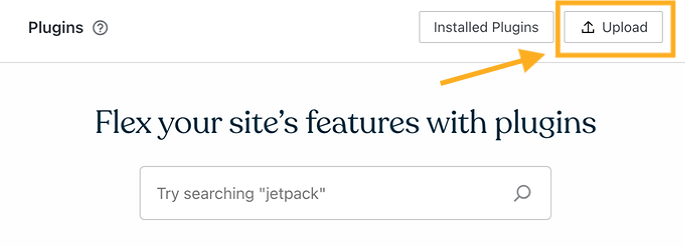
Because Telex blocks run inside WordPress itself, the Minesweeper game can then be embedded on a page just like any other block.
” data-medium-file=”https://sme-insights.co.uk/wp-content/uploads/2025/11/minesweeper-block-scaled.jpg?w=300″ data-large-file=”https://sme-insights.co.uk/wp-content/uploads/2025/11/minesweeper-block-scaled.jpg?w=1024″ loading=”lazy” width=”2840″ height=”1404″ src=”https://sme-insights.co.uk/wp-content/uploads/2025/11/minesweeper-block-scaled.jpg” alt=”Adding the Minesweeper block” class=”wp-image-82029″ srcset=”https://sme-insights.co.uk/wp-content/uploads/2025/11/minesweeper-block-scaled.jpg 2840w, https://sme-insights.co.uk/wp-content/uploads/2025/11/minesweeper-block-scaled.jpg?w=150&h=74 150w, https://sme-insights.co.uk/wp-content/uploads/2025/11/minesweeper-block-scaled.jpg?w=300&h=148 300w, https://sme-insights.co.uk/wp-content/uploads/2025/11/minesweeper-block-scaled.jpg?w=768&h=380 768w, https://sme-insights.co.uk/wp-content/uploads/2025/11/minesweeper-block-scaled.jpg?w=1024&h=506 1024w, https://sme-insights.co.uk/wp-content/uploads/2025/11/minesweeper-block-scaled.jpg?w=1440&h=712 1440w” sizes=”(max-width: 2840px) 100vw, 2840px”>
You can build other simple games in Telex, which we’ll dig into at the end of this article.
6. Cybersoldier
” data-medium-file=”https://sme-insights.co.uk/wp-content/uploads/2025/11/cybersoldier.jpg?w=300″ data-large-file=”https://sme-insights.co.uk/wp-content/uploads/2025/11/cybersoldier.jpg?w=1024″ loading=”lazy” width=”1400″ height=”694″ src=”https://sme-insights.co.uk/wp-content/uploads/2025/11/cybersoldier.jpg” alt=”The Cybersoldier game in WordPress” class=”wp-image-82030″ srcset=”https://sme-insights.co.uk/wp-content/uploads/2025/11/cybersoldier.jpg 1400w, https://sme-insights.co.uk/wp-content/uploads/2025/11/cybersoldier.jpg?w=150&h=74 150w, https://sme-insights.co.uk/wp-content/uploads/2025/11/cybersoldier.jpg?w=300&h=149 300w, https://sme-insights.co.uk/wp-content/uploads/2025/11/cybersoldier.jpg?w=768&h=381 768w, https://sme-insights.co.uk/wp-content/uploads/2025/11/cybersoldier.jpg?w=1024&h=508 1024w” sizes=”(max-width: 1400px) 100vw, 1400px”>
Live out your 8 Mile fantasies with Cybersoldier, a virtual rap battle.
With Cybersoldier, users can create accounts on your site, design a custom rapper Avatar, and battle with other registered players. Players will be alerted via email when someone starts a battle with them.
If you run a music site or a community of creative readers or writers, Cybersoldier can strengthen relationships between site visitors.
Since users need to return to your site to respond to battles, Cybersoldier also encourages repeat visits and ongoing engagement.
How to add Cybersoldier to your WordPress site
Cybersoldier is another plugin-enabled game that you can install directly from the WordPress Plugin Marketplace.
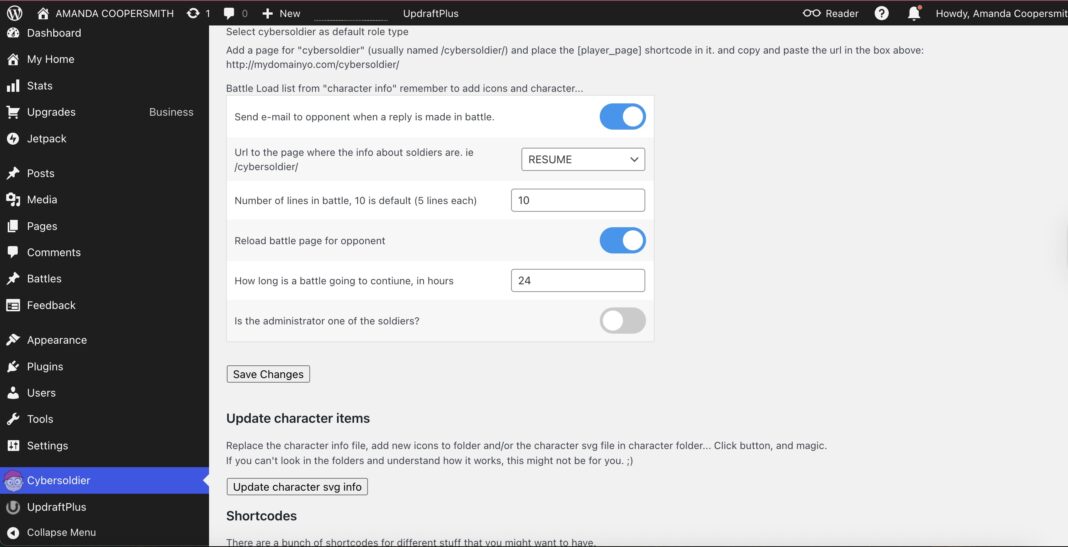
Once activated, you’ll see a Cybersoldier settings page in your WordPress admin dashboard.
From the settings page, you can set some of the main rules around your battles, including how long each battle lasts and how long each diss can be.
” data-medium-file=”https://sme-insights.co.uk/wp-content/uploads/2025/11/cybersoldier-admin-page-scaled.jpg?w=300″ data-large-file=”https://sme-insights.co.uk/wp-content/uploads/2025/11/cybersoldier-admin-page-scaled.jpg?w=1024″ loading=”lazy” width=”2770″ height=”1418″ src=”https://sme-insights.co.uk/wp-content/uploads/2025/11/cybersoldier-admin-page-scaled.jpg” alt=”Adding the Cybersoldier game” class=”wp-image-82032″ srcset=”https://sme-insights.co.uk/wp-content/uploads/2025/11/cybersoldier-admin-page-scaled.jpg 2770w, https://sme-insights.co.uk/wp-content/uploads/2025/11/cybersoldier-admin-page-scaled.jpg?w=150&h=77 150w, https://sme-insights.co.uk/wp-content/uploads/2025/11/cybersoldier-admin-page-scaled.jpg?w=300&h=154 300w, https://sme-insights.co.uk/wp-content/uploads/2025/11/cybersoldier-admin-page-scaled.jpg?w=768&h=393 768w, https://sme-insights.co.uk/wp-content/uploads/2025/11/cybersoldier-admin-page-scaled.jpg?w=1024&h=524 1024w, https://sme-insights.co.uk/wp-content/uploads/2025/11/cybersoldier-admin-page-scaled.jpg?w=1440&h=737 1440w” sizes=”(max-width: 2770px) 100vw, 2770px”>
The page also contains directions for adding necessary shortcodes to your site, including one for adding a player’s page and a running Battle List.
7. Personal Dictionary
” data-medium-file=”https://sme-insights.co.uk/wp-content/uploads/2025/11/personal-dictionary-games.jpg?w=300″ data-large-file=”https://sme-insights.co.uk/wp-content/uploads/2025/11/personal-dictionary-games.jpg?w=1024″ loading=”lazy” width=”1400″ height=”595″ src=”https://sme-insights.co.uk/wp-content/uploads/2025/11/personal-dictionary-games.jpg” alt=”The Personal Dictionary game on WordPress.com” class=”wp-image-82033″ srcset=”https://sme-insights.co.uk/wp-content/uploads/2025/11/personal-dictionary-games.jpg 1400w, https://sme-insights.co.uk/wp-content/uploads/2025/11/personal-dictionary-games.jpg?w=150&h=64 150w, https://sme-insights.co.uk/wp-content/uploads/2025/11/personal-dictionary-games.jpg?w=300&h=128 300w, https://sme-insights.co.uk/wp-content/uploads/2025/11/personal-dictionary-games.jpg?w=768&h=326 768w, https://sme-insights.co.uk/wp-content/uploads/2025/11/personal-dictionary-games.jpg?w=1024&h=435 1024w” sizes=”(max-width: 1400px) 100vw, 1400px”>
With Personal Dictionary, students can create digital flashcards, and educators can monitor student progress in real-time.
This plugin allows website users to create and organize personal vocabulary lists right on your site. Once a user has created a dictionary of at least four words, they can practice the words using the tool’s built-in games.
The first game, “Find the Word,” gives the word’s definition or translation with four word options. Users must select the correct word out of the four provided words.
” data-medium-file=”https://sme-insights.co.uk/wp-content/uploads/2025/11/personal-dictionary-wordpress-game.jpg?w=300″ data-large-file=”https://sme-insights.co.uk/wp-content/uploads/2025/11/personal-dictionary-wordpress-game.jpg?w=1024″ loading=”lazy” width=”1400″ height=”517″ src=”https://sme-insights.co.uk/wp-content/uploads/2025/11/personal-dictionary-wordpress-game.jpg” alt=”The personal dictionary WordPress game” class=”wp-image-82035″ srcset=”https://sme-insights.co.uk/wp-content/uploads/2025/11/personal-dictionary-wordpress-game.jpg 1400w, https://sme-insights.co.uk/wp-content/uploads/2025/11/personal-dictionary-wordpress-game.jpg?w=150&h=55 150w, https://sme-insights.co.uk/wp-content/uploads/2025/11/personal-dictionary-wordpress-game.jpg?w=300&h=111 300w, https://sme-insights.co.uk/wp-content/uploads/2025/11/personal-dictionary-wordpress-game.jpg?w=768&h=284 768w, https://sme-insights.co.uk/wp-content/uploads/2025/11/personal-dictionary-wordpress-game.jpg?w=1024&h=378 1024w” sizes=”(max-width: 1400px) 100vw, 1400px”>
Students can also play “Find the Definition,” “Matching Word,” and “Write the Translation.”
Teachers, tutors, schools, and other learning professionals who have administrative access to WordPress can utilize this tool. On the backend, you can monitor students’ Personal Dictionary usage, including how many words have been saved, view student progress on games, and track leaderboards.
How to add Personal Dictionary to your WordPress site
Personal Dictionary is available for installation in the WordPress Plugin Marketplace.
Once activated, you can add the plugin’s shortcode [ayspd_userpage] to a Shortcode block on any page. This will embed the tool into your site.
8. Scratch & Win
” data-medium-file=”https://sme-insights.co.uk/wp-content/uploads/2025/11/scratch-and-win.jpg?w=300″ data-large-file=”https://sme-insights.co.uk/wp-content/uploads/2025/11/scratch-and-win.jpg?w=1024″ loading=”lazy” width=”1400″ height=”699″ src=”https://sme-insights.co.uk/wp-content/uploads/2025/11/scratch-and-win.jpg” alt=”The Scratch & Win WordPress game” class=”wp-image-82036″ srcset=”https://sme-insights.co.uk/wp-content/uploads/2025/11/scratch-and-win.jpg 1400w, https://sme-insights.co.uk/wp-content/uploads/2025/11/scratch-and-win.jpg?w=150&h=75 150w, https://sme-insights.co.uk/wp-content/uploads/2025/11/scratch-and-win.jpg?w=300&h=150 300w, https://sme-insights.co.uk/wp-content/uploads/2025/11/scratch-and-win.jpg?w=768&h=383 768w, https://sme-insights.co.uk/wp-content/uploads/2025/11/scratch-and-win.jpg?w=1024&h=511 1024w” sizes=”(max-width: 1400px) 100vw, 1400px”>
Scratch and Win is a digital giveaway game that helps you capture visitor information and referrals.
With the plugin, you can set up your own giveaways, which will show up to users as a pop-up after they complete specific actions, such as scrolling down the page or clicking on a link.
Users can scratch to win in exchange for their email address, and can get additional scratch cards by referring friends or returning to the site on another day.
” data-medium-file=”https://sme-insights.co.uk/wp-content/uploads/2025/11/scratch-and-win-wordpress-game.jpg?w=300″ data-large-file=”https://sme-insights.co.uk/wp-content/uploads/2025/11/scratch-and-win-wordpress-game.jpg?w=1024″ loading=”lazy” width=”1600″ height=”804″ src=”https://sme-insights.co.uk/wp-content/uploads/2025/11/scratch-and-win-wordpress-game.jpg” alt=”The Scratch and Win WordPress game” class=”wp-image-82037″ srcset=”https://sme-insights.co.uk/wp-content/uploads/2025/11/scratch-and-win-wordpress-game.jpg 1600w, https://sme-insights.co.uk/wp-content/uploads/2025/11/scratch-and-win-wordpress-game.jpg?w=150&h=75 150w, https://sme-insights.co.uk/wp-content/uploads/2025/11/scratch-and-win-wordpress-game.jpg?w=300&h=151 300w, https://sme-insights.co.uk/wp-content/uploads/2025/11/scratch-and-win-wordpress-game.jpg?w=768&h=386 768w, https://sme-insights.co.uk/wp-content/uploads/2025/11/scratch-and-win-wordpress-game.jpg?w=1024&h=515 1024w, https://sme-insights.co.uk/wp-content/uploads/2025/11/scratch-and-win-wordpress-game.jpg?w=1440&h=724 1440w” sizes=”(max-width: 1600px) 100vw, 1600px”>
Scratch and Win is best for sites looking to ramp up their marketing and lead-building efforts through email advertising. If you sell custom merch through a WooCommerce store or have branded partnership opportunities that involve product giveaways, Scratch and Win can help you build engagement and brand loyalty.
How to add Scratch and Win to your WordPress site
Scratch and Win is available as a Free Plugin via the WordPress Plugin Marketplace.
Once activated, you will see a Scratch and Win page in your Admin Dashboard where you can configure key settings.
However, to launch and manage the plugin, you will need to create an account with the plugin’s creator brand, Appsmav, which has its own dashboard for scratch and win lead management.
How to add games to WordPress
There are several ways to install games on WordPress. Below, we’ll dig into a few ways to get started.
Install a plugin
The easiest way to install a game is by using a plugin.
You can find and install plugins from the WordPress Plugin Marketplace or by downloading a developer’s code file and installing it on the Plugin page with the Upload button.

Game installation and activation can vary, so be sure to read the installation information provided by the publisher.
Embed an external game
Some games aren’t available as plugins, but can be embedded into your site from an external site.
If the game provides a link from a supported WordPress provider, paste it into an Embed block, and WordPress will automatically convert it.
” data-medium-file=”https://sme-insights.co.uk/wp-content/uploads/2025/11/embed.jpg?w=300″ data-large-file=”https://sme-insights.co.uk/wp-content/uploads/2025/11/embed.jpg?w=1024″ loading=”lazy” width=”1400″ height=”572″ src=”https://sme-insights.co.uk/wp-content/uploads/2025/11/embed.jpg” alt=”Embedding a WordPess game” class=”wp-image-82039″ srcset=”https://sme-insights.co.uk/wp-content/uploads/2025/11/embed.jpg 1400w, https://sme-insights.co.uk/wp-content/uploads/2025/11/embed.jpg?w=150&h=61 150w, https://sme-insights.co.uk/wp-content/uploads/2025/11/embed.jpg?w=300&h=123 300w, https://sme-insights.co.uk/wp-content/uploads/2025/11/embed.jpg?w=768&h=314 768w, https://sme-insights.co.uk/wp-content/uploads/2025/11/embed.jpg?w=1024&h=418 1024w” sizes=”(max-width: 1400px) 100vw, 1400px”>
If the game offers an <iframe> or <script> embed, you need to paste that code into a Custom HTML block. Custom HTML blocks are available on WordPress.com’s Business plan and above.
Build a game with Telex
If you’re adventurous, you can try Automattic’s new tool Telex to build a custom game plugin using natural language instructions.
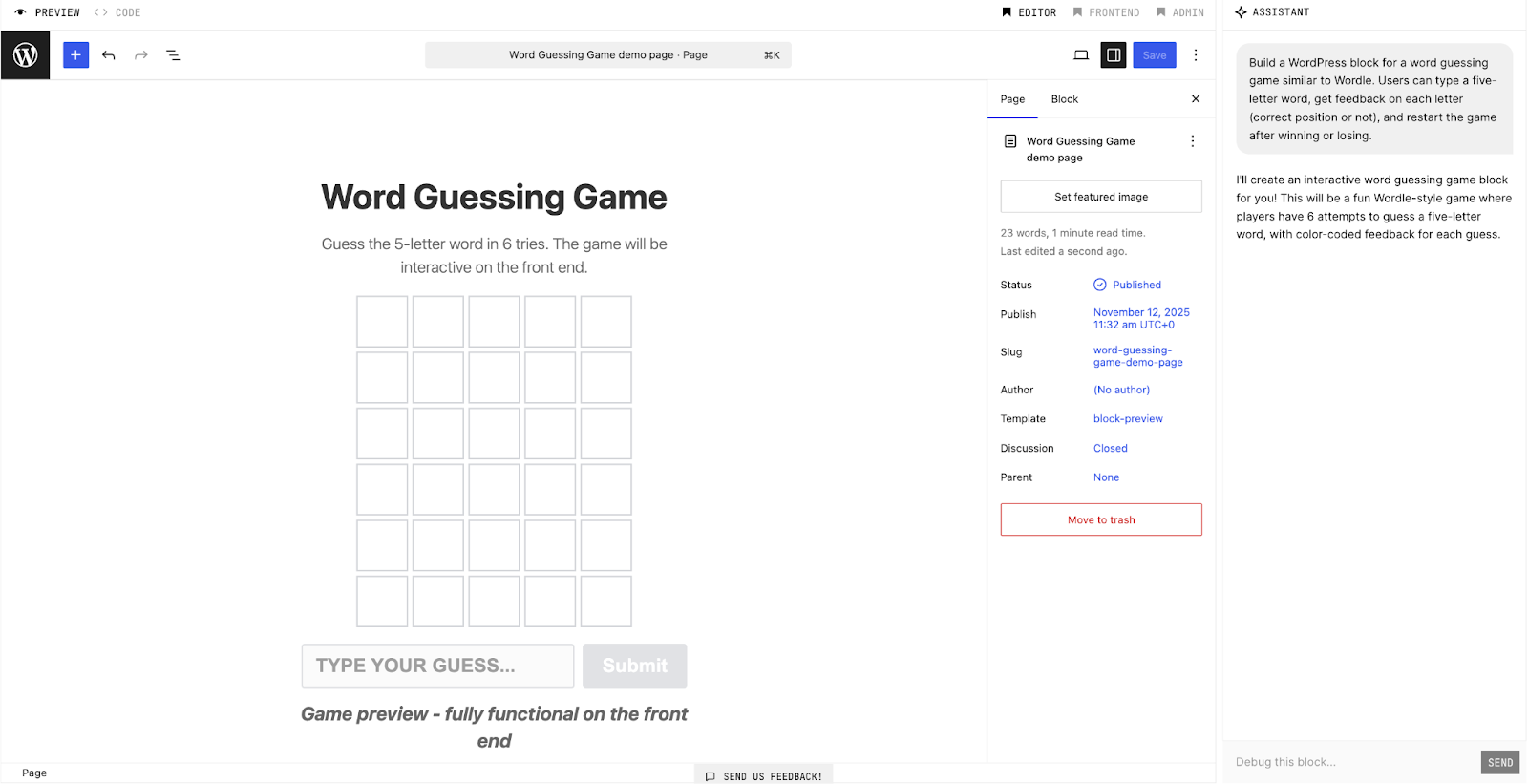
Once you’ve created and tested your game on Telex, you can download the plugin and install it on your site. You can also share a Telex preview link.
Link to a game
If there’s no way to embed a particular game on your site, you can still encourage people to check it out on another website.
Simply use a link or a button to direct visitors to the game in another tab.
Level up your website with games
One of WordPress’s greatest assets is its flexibility and huge variety of developer-created plugins.
WordPress game plugins make it possible to turn a static webpage into a unique, engaging experience.
If you’re interested in adding games to your site, there’s more to explore. Check out the full WordPress games plugin library or cook up something new with Telex.